Forum Replies Created
-
AuthorPosts
-
James
KeymasterWhat version of Windows?
The fact that both 1.42 and 1.44 both crash would tend to point to a problem within the nucleus of Windows, rather than BAE.
Are you removing the Pipeline as well? You may have to go into Device manager and uninstall the Pipeline devices manually (under “Audio Inputs and Outputs” in Win 11).
Remember to reboot after the uninstall, before attempting to re-install.KeymasterDo you have any documentation on this that we can look over?
May 30, 2023 at 3:20 pm in reply to: Now Is Your Chance To Add To The Breakaway One Wish/Bug List #17185KeymasterI discussed this with Leif once before and his reasoning was that a lot of VSTs crash and it is easier to keep 16 bit VSTs in their own memory space so that it doesn’t crash Breakaway One as well.
I’ll raise it with him again. Maybe the tides have turned since then.
KeymasterThe MPX signal can carry the full FM bandwidth, whether mono or stereo. If you can switch easily between the two, why not try it on an experimental broadcast? In stereo, the 19 kHz pilot tone should automatically be generated, and stereo receivers should then respond to that.
KeymasterWell, the MPX signal is a L/R composite, so, if the input is stereo, the output will also be stereo. You will need to ensure that your deviation is within legal limits, of course, so you may have to tweak a preset to suit your format.
KeymasterThe general aim is to minimise the jitter figure, because that number represents the number of “lost” frames where the incoming (your playout software) data doesn’t quite fill out the sound device’s buffer size.
Sometimes, it is better to not use KS, even though that is the optimum setting, but you can always experiment and possibly come up with the best KS buffer size to give you the lowest jitter (and therefore) latency/jitter.April 30, 2023 at 4:11 pm in reply to: pre-ringing artifacts on transients (FM module in HQ mode) #17165KeymasterLeif’s own description of the Reference Settings preset.
“This is the preset the Breakaway Core algorithm was created with. This preset is as transparent and neutral as they come — great on its own, or as a starting point for any custom sound.
Imagine that you’re designing an audio processor, either digital or analog. Before there is a user interface, you must still choose correct component values to make the circuit behave, and sound good. When that’s done, you decide which parameters should be user-adjustable and which should stay hard-coded. The user-adjustable ones must have a default value, which should ideally match what you came up with as sounding good while writing the algorithm. Those are the Reference Settings, and that is this preset.”
April 30, 2023 at 3:25 pm in reply to: pre-ringing artifacts on transients (FM module in HQ mode) #17163KeymasterWhat preset are you using? Does the effect change with different presets? Try it with “Reference Settings”, as this is the least processed preset.
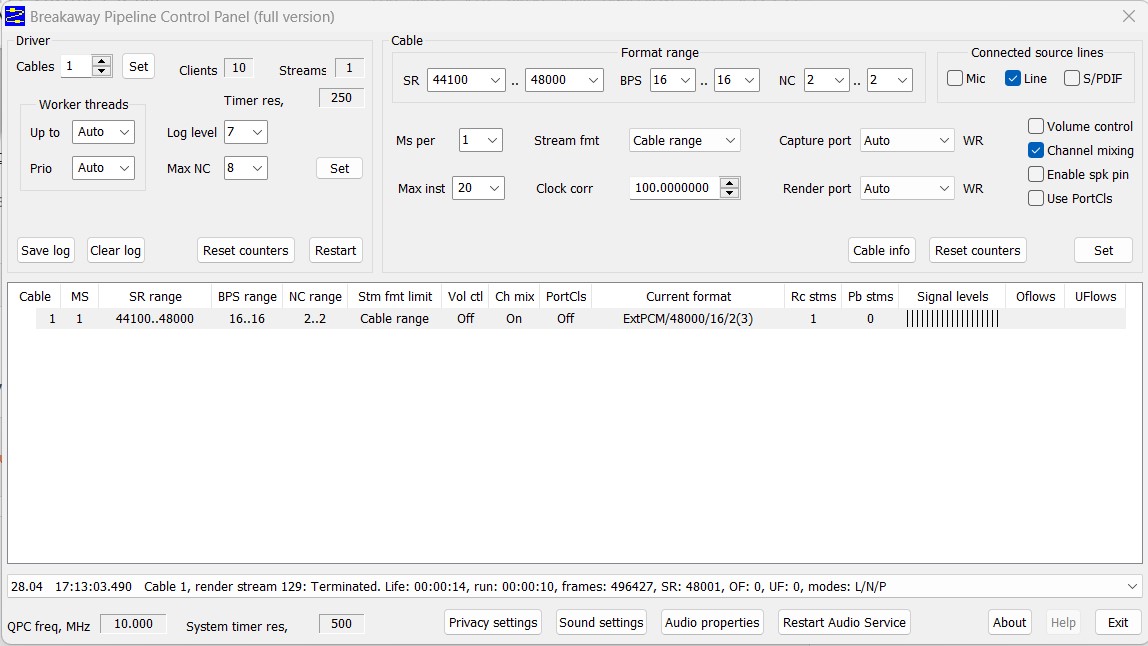
April 28, 2023 at 12:50 am in reply to: How to reset the preferences in the Breakaway Pipeline? #17158KeymasterI believe that these are the default settings.
https://ceaforum.net/wp-content/uploads/2023/04/BAE-Pipeline.jpgApril 27, 2023 at 3:40 pm in reply to: How to reset the preferences in the Breakaway Pipeline? #17153KeymasterIf you have the Breakaway Audio Control Panel program installed, you should just be able to modify the parameters to bring it back to its defaults.
BAE purposely only allows one line, as it was never designed to modify output to other audio programs. Many people have tried over the years to record the output, but I believe that the program is coded to prevent this. Maybe the re-write, when we see it, will relax this restriction.
April 21, 2023 at 3:03 pm in reply to: Now Is Your Chance To Add To The Breakaway Audio Enhancer Wish/Bug List #17149KeymasterThank you for reporting. I will investigate further.
I usually leave the pipeline at the default 44100/48000, as this takes in any CDs or DVDs that I might play.KeymasterBoth of these products have a niche in the broadcast domain. Trying to compare their niche is possibly like comparing a Mazda 3 to a BMW or (insert your favourite luxury car here). Both will transport you from A to B in relative luxury, but there are definable differences in the two vehicles, and some of the differences may be significant to some drivers, but some may not.
Similarly, some broadcasters insist on the best of the best, and have the budgets to achieve that, whereas many have to produce the most competitive sound output they can achieve with far smaller budgets.
1. The core code and algorithms are almost identical, but there have been extensions to that core specific to Omnia 9, including the number of bands, undo etc. These extensions possibly could be incorporated in future releases of BA1, but at an increase in price.
2. Surprisingly, the soundcard doesn’t have to be particularly “high end”. It obviously needs to faithfully reproduce the source material without colouration. Remember that FM audio is “capped” at 50 Hz to 15 kHz to allow for the 4 kHz safe zone and pilot tome at 19 kHz, so having a card capable of playing sounds above that is a moot point.
3. I will need to speak to my engineer to provide the specifics of what additional hardware is required for MPX, as he is the “hands on” guy. I’ll try to provide specifics later.
4. There a many, many operational radio stations who have a Windows-based “black box” running BA1 at the core of their broadcasting chain. Some have gone the extra mile and built it into a 19 inch rack mount case, but many are running a NUC because it doesn’t need additional fans which are noisy, attract dust and wear out.
5. The demo version of Breakaway One is fully functional, so you can set it up to achieve everything you want for a parallel trial, bearing in mind that there will be a random voiceover inserted into the program material until the product is registered. Breakaway Marketing can help advise you on which modules you need, but I would definitely recommend the Remote Management module so that you can make tweaks from afar.
April 11, 2023 at 2:16 pm in reply to: Now Is Your Chance To Add To The Breakaway Audio Enhancer Wish/Bug List #17142KeymasterThe problem is, the way that BAE is currently written, you must run the TEST option to firm up the buffer and sample rate options. The inputs and outputs are only scanned in the configuration process and only “live” options at that time are listed.
Breakaway Audio Enhancer is slated for a complete re-write as it was first coded when Windows XP was the OS of choice, so these types of suggestions will be considered for version 2.
April 3, 2023 at 2:54 pm in reply to: Fine Tuning Breakaway Audio Enhancer – All about Interfaces, Buffers and Rates #17139KeymasterI am seeking absolute clarification, but I believe that in FM mode, BAE limits the top end frequencies to less that 15kHz, to allow for the 4 kHz guard band either side of the 19 kHz pilot tone used to produce a stereo FM signal.
An FM stereo signal is broadcast as a mono signal 53 kHz wide, with the Right channel (23 – 53 kHz) “stacked” on top of the Left channel (50 Hz to 15 kHz). A pilot tone at 19 kHz separates the two channels, with a guard band of 4 kHz either side of that to allow for deviation. This means that the useable music frequencies cannot go above 15 kHz without encroaching on the guard band.
April 2, 2023 at 9:34 pm in reply to: Fine Tuning Breakaway Audio Enhancer – All about Interfaces, Buffers and Rates #17136KeymasterThat looks OK, but it really depends on your particular hardware. If you find the jitter figure (when you turn on the “test” light) is higher than (say) 15%, try a different combination of buffers and buffer size until you get the lowest numbers. However, the larger the buffers, the more latency becomes noticeable, because it takes BAE some time to fill the buffers.
So, ultimately, it is a juggling act between minimal jitter and minimal latency. For instance, you might get lower jitter numbers with a buffer size of 882, but it may introduce a degree of latency. At the end of the day, if you can’t hear the dropped frames (jitter), it may not be a problem, but you should aim for less than 5% if you can achieve it.
-
AuthorPosts